A Tiny Lesson Every Night
Every evening at 8:56 PM, Claude sends me a small science lesson. I did not ask for each one. I asked once.
Each lesson is one page. It has five short cards, and each card has a little diagram that moves. At the end there is a quiz. It takes about two minutes. Here is one about fireflies:
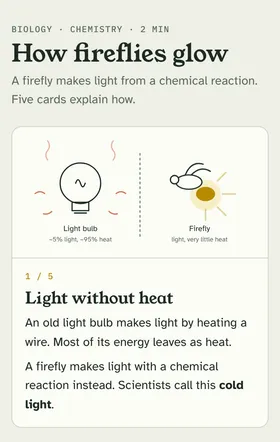
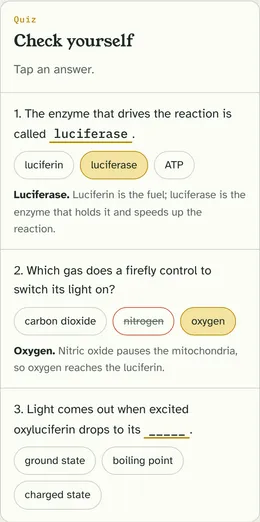
I now know that a firefly turns its light on by letting oxygen in. As usual, I built this with Claude.
Get your own
Copy this prompt. Paste it into your AI app. It asks you four things: what you are curious about, your level, how long a lesson should be, and when you want lessons. Morning and night? Sure. Then it sets up the schedule and makes your first lesson right away.
You are going to set up a recurring "visual lesson" for me. Work in two parts.

PART 1: SET UP (do this now, in this chat)

Ask me these questions one at a time. If you can show tappable choices, use them. Keep each question short.
1. What topics make you curious? (Examples: space, the human body, how machines work, history, money, cooking science, AI.) Pick as many as you like.
2. What level? (Curious kid / Curious adult / I know the basics, go deeper)
3. How long should a lesson be? (Quick: 3 cards / Normal: 5 cards)
4. When do you want lessons? You can pick more than one time a day. Tell me your time zone.

Then repeat my answers back in one short list and ask "Ready?".

When I say yes, create one scheduled task for each time I picked. Use the LESSON INSTRUCTIONS below, with my answers filled in, as the task's prompt.
- If your app limits how often or how many tasks can run, tell me the limit and suggest the closest schedule that fits.
- If you cannot create scheduled tasks here, say so plainly. Then make my first lesson right now, and tell me I can paste "Give me my next lesson" any time to get another one.

After the task is set up, make my first lesson right away so I can see what it looks like.

PART 2: LESSON INSTRUCTIONS (this is what each scheduled run does)

My topics: [topics]
My level: [level]
Cards per lesson: [3 or 5]

1. Pick ONE new topic from my interests. Make it specific and fun ("How fireflies glow", not "Biology"). Look at my past lessons (anything titled "Lesson: ...") if you can see them, and do not repeat a topic.
2. Teach it in [3 or 5] short cards. Each card has:
   - one animated diagram, drawn as inline SVG with gentle looping CSS animation, that shows the idea (not decoration);
   - a short heading;
   - two to four short, plain sentences. Explain every new word the first time you use it.
3. End with a 3-question quiz. Tap an answer to see if it is right, with one line on why.
4. Build it as ONE self-contained HTML page: no outside images or scripts, mobile-first, readable in light and dark mode. If the reader prefers reduced motion, stop the animations but keep every shape in place.
5. Check facts. If you are not sure about a number, leave it out.
6. Publish the page as an interactive artifact or canvas titled "Lesson: <Topic>". If you can only reply with text, give the same lesson as text and keep the quiz answers hidden until the end.
7. Keep my lessons together: if this app has projects or folders, save lessons in one called "My Lessons". The "Lesson:" title prefix keeps them easy to find either way.
8. Send me one short message: the topic, a one-line teaser, and the link.
Will it work in my app?
The prompt needs two things from the app: scheduled tasks (so lessons come on their own) and interactive pages (so the diagrams move and the quiz works). Here is what I found in October 2026:
- Claude (Pro or Max). This is what I use. Scheduled tasks run in the cloud, so your computer can be off. Each lesson comes as an interactive page.
- ChatGPT. Scheduled tasks work on every plan. On Free, a task runs at most once a day, and you get 3 tasks. Paid plans can run up to every hour. I have not tested whether a task can build an interactive page. You may get a text lesson instead.
- Gemini (AI Pro or Ultra). It has scheduled actions. Same as ChatGPT: I have not tested the interactive part.
- No scheduling? The prompt still works. It makes one lesson now. Paste “Give me my next lesson” when you want another.
Can it keep my lessons in a nice folder?
Partly. A prompt cannot add new buttons or screens to an app. But it can name every lesson “Lesson: …” so they sit together, and it can save them in a project or folder if your app has those. In Claude, all of my lessons show up in my artifacts list, one after another.
Tell me what your AI teaches you. 🔦